

As a provider of All-in-one Web Guides, I am excited to delve into the diverse visual design options that our product offers. In the world of web handling and guiding systems, visual design is not just about aesthetics; it plays a crucial role in functionality, usability, and overall performance. This blog post will explore the various visual design aspects of our All-in-one Web Guide and how they benefit our customers.
1. Intuitive User Interface (UI) Design
The user interface is the first point of contact between the operator and the All-in-one Web Guide. Our UI is designed with a focus on simplicity and intuitiveness. The control panel features large, easy-to-read displays that provide real-time information about the web's position, speed, and other critical parameters. Icons and symbols are used consistently throughout the interface, making it easy for operators to understand and operate the system without extensive training.
For example, we use color-coding to indicate different states of the web guide. Green might represent normal operation, while red could signal an alarm or a fault. This visual cue allows operators to quickly identify and address issues, minimizing downtime and ensuring smooth production.
The layout of the UI is also carefully designed to prioritize important information. The most critical data, such as the web's position error, is prominently displayed at the center of the screen, while less important details are placed in secondary areas. This hierarchical arrangement ensures that operators can focus on the most relevant information at a glance.
2. Customizable Display Options
We understand that different customers have different needs and preferences when it comes to visualizing data. That's why our All-in-one Web Guide offers customizable display options. Operators can choose from a variety of display modes, including numerical displays, graphical representations, and combination views.
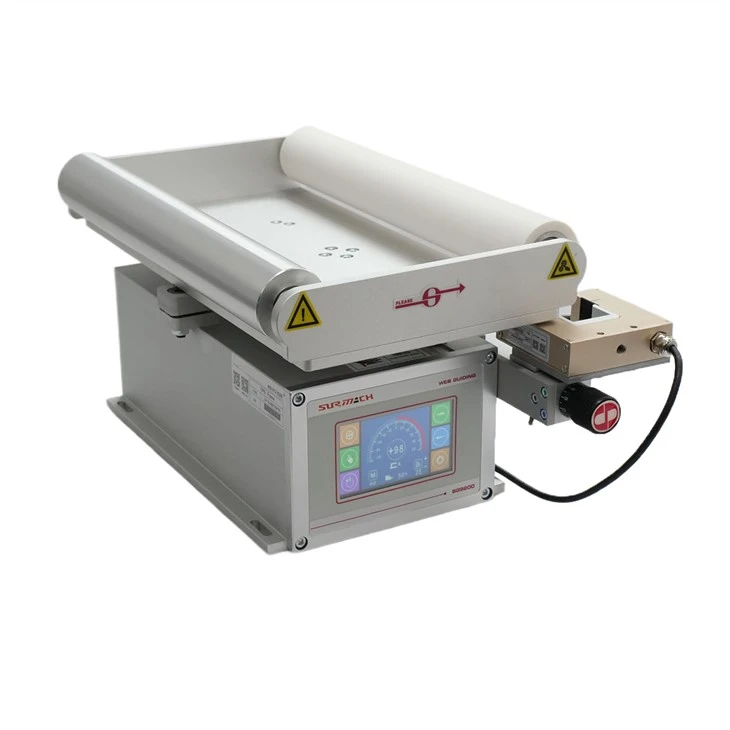
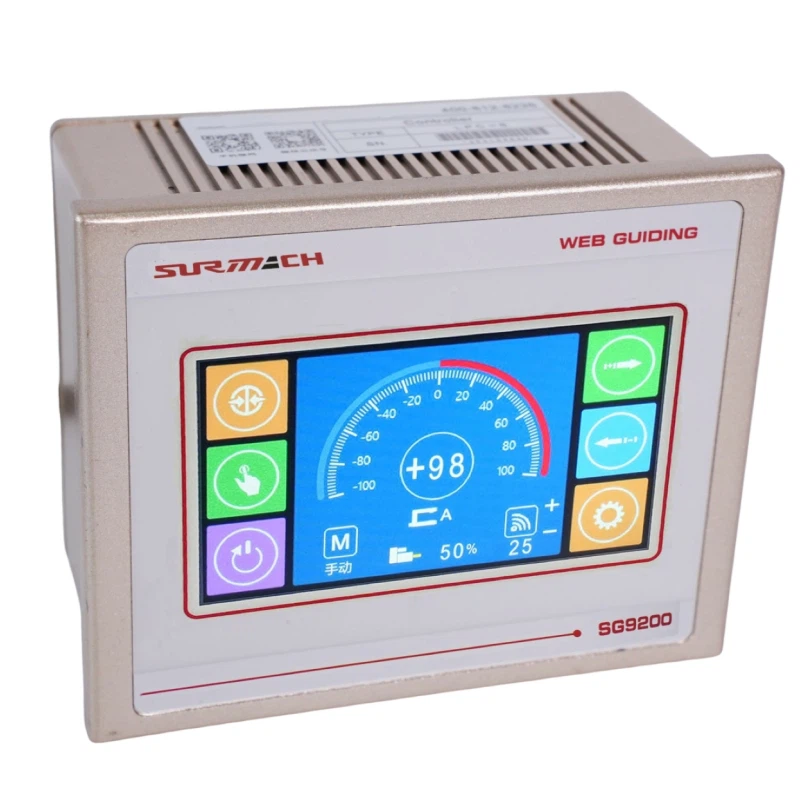
Numerical displays are ideal for operators who need precise data readings. They provide accurate values for parameters such as web position, speed, and tension. Graphical representations, on the other hand, offer a more intuitive way to understand the web's behavior. For example, a line graph can show the web's position over time, allowing operators to identify trends and patterns.
Combination views combine the best of both worlds, presenting numerical data alongside graphical representations. This allows operators to have a comprehensive understanding of the web's status and make informed decisions.
In addition to choosing the display mode, operators can also customize the appearance of the display. They can adjust the font size, color, and background to suit their visual preferences and working environment. This level of customization ensures that the All-in-one Web Guide can be tailored to the specific needs of each customer.
3. Interactive Visualization Tools
To further enhance the user experience, our All-in-one Web Guide is equipped with interactive visualization tools. These tools allow operators to interact with the data in real-time, providing a deeper understanding of the web's behavior.
One such tool is the zoom function. Operators can zoom in on specific areas of the display to get a closer look at the data. This is particularly useful when analyzing small changes in the web's position or when identifying subtle trends.
Another interactive tool is the data logging and playback feature. This feature allows operators to record data over a period of time and then playback the recorded data at a later time. This is useful for troubleshooting, analyzing historical data, and identifying recurring issues.
The All-in-one Web Guide also offers a 3D visualization option. This option provides a three-dimensional view of the web guide system, allowing operators to visualize the web's movement in a more realistic way. The 3D visualization can be rotated, zoomed, and panned to provide different perspectives, giving operators a better understanding of the system's operation.
4. Integration with External Visual Systems
Our All-in-one Web Guide is designed to integrate seamlessly with external visual systems, such as cameras and sensors. This integration allows operators to have a more comprehensive view of the web handling process.
For example, cameras can be installed along the web path to provide real-time video monitoring of the web's movement. The video feed can be integrated with the All-in-one Web Guide's display, allowing operators to see the web's position and behavior simultaneously. This is particularly useful for detecting web breaks, wrinkles, and other defects.
Sensors can also be used to provide additional data about the web's properties, such as tension, thickness, and temperature. This data can be integrated with the All-in-one Web Guide's display, providing operators with a more complete picture of the web handling process.
By integrating with external visual systems, our All-in-one Web Guide provides a more comprehensive and accurate view of the web handling process, allowing operators to make better decisions and improve overall productivity.
5. Compatibility with Different Web Guide Systems
Our All-in-one Web Guide is designed to be compatible with a wide range of web guide systems, including Web Guide with Splice Table, Split Body Web Guide, Web Winding Guide, and Web Guide Steering Frame. This compatibility ensures that our All-in-one Web Guide can be easily integrated into existing web handling systems, providing a cost-effective solution for upgrading and improving the performance of these systems.
The visual design of our All-in-one Web Guide is also consistent across different web guide systems. This means that operators can use the same interface and visualization tools regardless of the type of web guide system they are using. This simplifies the training process and reduces the learning curve for operators, making it easier for them to operate and maintain the web guide systems.
Conclusion
In conclusion, our All-in-one Web Guide offers a wide range of visual design options that are designed to enhance functionality, usability, and overall performance. From the intuitive user interface to the customizable display options, interactive visualization tools, integration with external visual systems, and compatibility with different web guide systems, our All-in-one Web Guide provides a comprehensive solution for web handling and guiding.
If you are interested in learning more about our All-in-one Web Guide or would like to discuss your specific requirements, please feel free to contact us. We would be happy to provide you with more information and assist you in making the right decision for your web handling needs.
References
- Industry standards and best practices in web guide design
- User feedback and requirements from our customers
- Research and development in the field of visual design for industrial control systems